
7 Best Tablets for Study Under ₹20,000 in India (2026) – Top Picks for Students
Posted on |
Finding the Best Tablets for Study isn’t as easy as it seems. With dozens of brands offering similar features, students often end up confused about which tablet provides the best value for money.
Whether you’re attending online classes, reading PDFs, making digital notes, watching educational videos, or preparing for competitive exams like UPSC, NEET, JEE, SSC, or Banking, a good tablet can significantly improve your learning experience.
The good news? You don’t need to spend ₹40,000–₹60,000 to get a reliable study tablet. Today, several tablets under ₹20,000 offer excellent displays, long battery life, smooth performance, and support for multitasking.
If portability is your priority, you can also explore our guide on lightweight tablets for reading and travel to compare more compact options.
In this guide, we’ve carefully shortlisted the 7 Best Tablets for Study Under ₹20,000 in India (2026) based on performance, display quality, battery life, software experience, storage, and overall value.

Quick Comparison Table
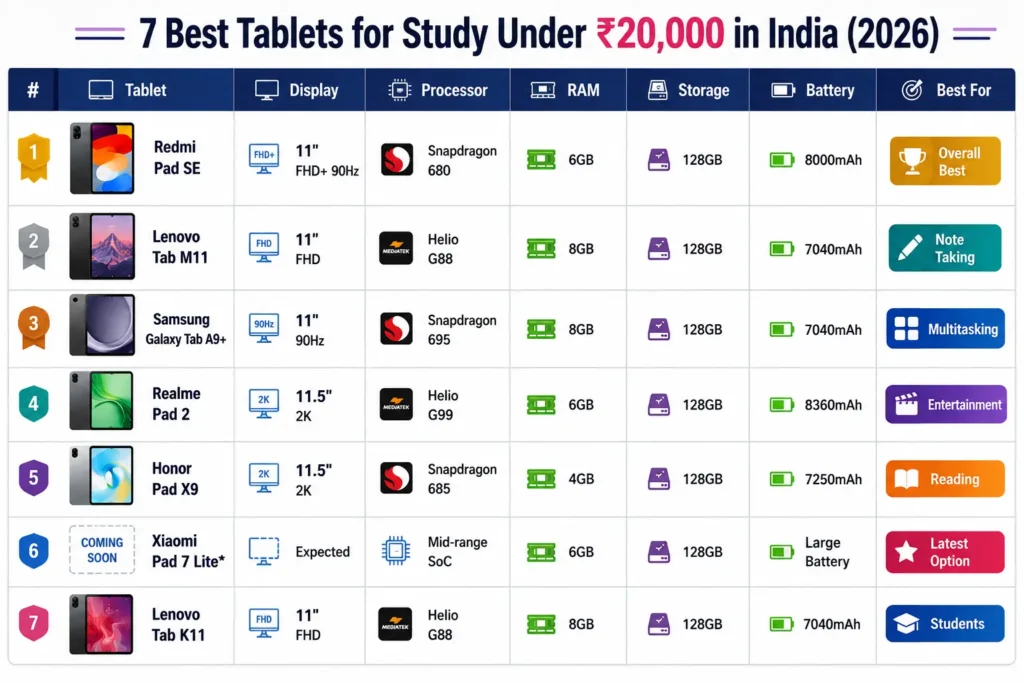
Note: Prices on Amazon and Flipkart change frequently during sales. Check the latest deals before purchasing.
How We Selected the Best Tablets for Study
Choosing the Best Tablets for Study isn’t only about the processor. We evaluated each tablet using the following criteria:
- Smooth performance for online classes
- Comfortable display for reading PDFs and eBooks
- Long battery life for full-day usage
- Good speakers for lectures
- Reliable software updates
- Sufficient RAM for multitasking
- Value for money under ₹20,000
1. Redmi Pad SE – Best Overall Tablet for Students

Key Specifications
| Feature | Details |
|---|---|
| Display | 11-inch FHD+ LCD, 90Hz |
| Processor | Snapdragon 680 |
| RAM | 6GB |
| Storage | 128GB |
| Battery | 8000mAh |
| Charging | 10W |
| Weight | Approx. 478g |
Why It Stands Out
If you’re looking for the Best Tablets for Study without stretching your budget, the Redmi Pad SE is one of the strongest contenders.
Its 11-inch Full HD display offers plenty of screen space for reading eBooks, taking notes, attending online classes, and multitasking. The 90Hz refresh rate also makes scrolling through documents and websites feel smoother than standard 60Hz displays.
Powered by the Snapdragon 680 processor, the tablet easily handles educational apps such as Google Classroom, Microsoft OneNote, Zoom, Google Meet, and PDF readers. Students can also keep multiple browser tabs open without noticeable lag during regular study sessions.
One of its biggest strengths is the large 8000mAh battery, which can comfortably last an entire day of lectures, assignments, and revision.
Pros
- Large 11-inch display
- Smooth 90Hz refresh rate
- Excellent battery backup
- Reliable Snapdragon processor
- Good stereo speakers
- Great value for money
Cons
- Charging speed could be faster
- Not ideal for heavy gaming
Best For
- School students
- College students
- UPSC aspirants
- NEET preparation
- Reading PDFs
- Online classes
- Daily productivity
Rating: ⭐⭐⭐⭐⭐ (4.8/5)
2. Lenovo Tab M11 – Best Tablet for Digital Note-Taking

Key Specifications
| Feature | Details |
|---|---|
| Display | 11-inch Full HD |
| Processor | MediaTek Helio G88 |
| RAM | 8GB |
| Storage | 128GB |
| Battery | 7040mAh |
| Speakers | Quad Speakers |
| Stylus Support | ✓ Yes |
Why It Stands Out
Students who prefer writing digital notes instead of carrying notebooks should seriously consider the Lenovo Tab M11.
Its optional stylus support makes handwriting notes, annotating PDFs, solving mathematical equations, and sketching diagrams much easier. For engineering, medical, and design students, this can be a significant advantage.
The Helio G88 chipset delivers smooth everyday performance for online classes, educational apps, YouTube lectures, and multitasking. With 8GB RAM, switching between note-taking apps, browsers, and video lectures remains fluid.
The quad-speaker setup also enhances the experience while attending online lectures or watching educational videos.
Pros
- Stylus support
- Smooth multitasking
- 8GB RAM
- Quad speakers
- Excellent display
- Ideal for handwritten notes
Cons
- Average charging speed
- Cameras are basic
Best For
- College students
- Medical students
- Engineering students
- Note-taking
- Online learning
Rating: ⭐⭐⭐⭐☆ (4.7/5)
3. Samsung Galaxy Tab A9+ – Best Tablet for Multitasking

Key Specifications
| Feature | Details |
|---|---|
| Display | 11-inch LCD, 90Hz |
| Processor | Snapdragon 695 |
| RAM | 8GB |
| Storage | 128GB |
| Battery | 7040mAh |
| Software | One UI |
Why It Stands Out
Samsung has built a strong reputation for offering reliable Android tablets, and the Galaxy Tab A9+ continues that trend. It combines a smooth 90Hz display with the efficient Snapdragon 695 processor, making it an excellent choice for students who often juggle multiple apps.
Whether you’re researching on Chrome, taking notes in OneNote, joining a Google Meet lecture, or watching recorded classes on YouTube, the tablet handles everyday academic tasks with ease. Samsung’s One UI also includes productivity features such as split-screen multitasking, allowing you to view two apps side by side—for example, a PDF textbook and a notes app.
The tablet’s premium design, dependable software experience, and long-term usability make it a worthwhile investment for students who want a device that can last through several academic years.

Pros
- Powerful Snapdragon 695 processor
- Smooth 90Hz display
- Excellent software experience
- Good multitasking features
- Premium build quality
- Trusted Samsung ecosystem
Cons
- Fast charger may not be included
- Display is LCD instead of AMOLED
Best For
- College students
- Online classes
- Productivity
- Multitasking
- Educational apps
- Reading and note-taking
Rating: ⭐⭐⭐⭐⭐ (4.8/5)
Which Tablet Should You Choose?
If you’re still confused, here’s a quick recommendation:
- Best Overall: Redmi Pad SE
- Best for Note-Taking: Lenovo Tab M11
- Best for Multitasking: Samsung Galaxy Tab A9+
- Best Value Under ₹20,000: Redmi Pad SE
In the next section, we’ll cover four more excellent options, including the Realme Pad 2, Honor Pad X9, Xiaomi Pad 7 Lite (if available), and Lenovo Tab K11, followed by a detailed buying guide to help you make the right choice.
4. Realme Pad 2 – Best Tablet for Entertainment & Study

Key Specifications
| Feature | Details |
|---|---|
| Display | 11.5-inch 2K LCD, 120Hz |
| Processor | MediaTek Helio G99 |
| RAM | 6GB / 8GB |
| Storage | 128GB |
| Battery | 8360mAh |
| Charging | 33W SUPERVOOC |
| Audio | Quad Speakers with Dolby Atmos |
Why It Stands Out
If you’re looking for the Best Tablets for Study that can also handle entertainment, the Realme Pad 2 is one of the most feature-packed options under ₹20,000.
The highlight is its 11.5-inch 2K display with a 120Hz refresh rate, offering sharp text, vibrant visuals, and smooth scrolling. Reading digital textbooks, solving mock tests, or watching online lectures becomes much more comfortable on the larger high-resolution screen.
Powered by the MediaTek Helio G99, the tablet delivers solid everyday performance. It handles educational apps like Google Classroom, Microsoft Office, Zoom, Canva, and Chrome with ease. Light gaming during breaks is also possible without noticeable lag.
Another major advantage is the 33W fast charging, which helps students quickly recharge the large 8360mAh battery between classes.
Pros
- Stunning 2K display
- Smooth 120Hz refresh rate
- Powerful Helio G99 processor
- Excellent battery life
- Fast 33W charging
- Dolby Atmos quad speakers
Cons
- No official stylus support
- UI includes some pre-installed apps
Best For
- Online classes
- Watching recorded lectures
- Reading PDFs
- YouTube learning
- Casual gaming
- College students
Rating: ⭐⭐⭐⭐⭐ (4.8/5)
5. Honor Pad X9 – Best Large Display Tablet Under ₹20,000

Key Specifications
| Feature | Details |
|---|---|
| Display | 11.5-inch 2K LCD, 120Hz |
| Processor | Snapdragon 685 |
| RAM | 4GB |
| Storage | 128GB |
| Battery | 7250mAh |
| Speakers | 🔊 Six Speakers |
Why It Stands Out
The Honor Pad X9 is designed for students who spend hours reading notes, eBooks, and lecture slides. Its 11.5-inch 2K display offers plenty of screen space, reducing the need to zoom in while reading PDF documents or digital textbooks.
The Snapdragon 685 processor is optimized for everyday tasks such as browsing, note-taking, attending online classes, and using educational apps. While it isn’t meant for heavy gaming or professional editing, it performs well for academic use.
One of its standout features is the six-speaker setup, which produces clear audio during online lectures and video courses without requiring external speakers.
Pros
- Large 2K display
- Excellent speakers
- Premium metal body
- Comfortable reading experience
- Reliable battery backup
- Lightweight design
Cons
- 4GB RAM may feel limiting for heavy multitasking
- No cellular variant in many markets
Best For
- Reading eBooks
- Online learning
- UPSC preparation
- Competitive exam preparation
- Daily productivity
Rating: ⭐⭐⭐⭐☆ (4.6/5)
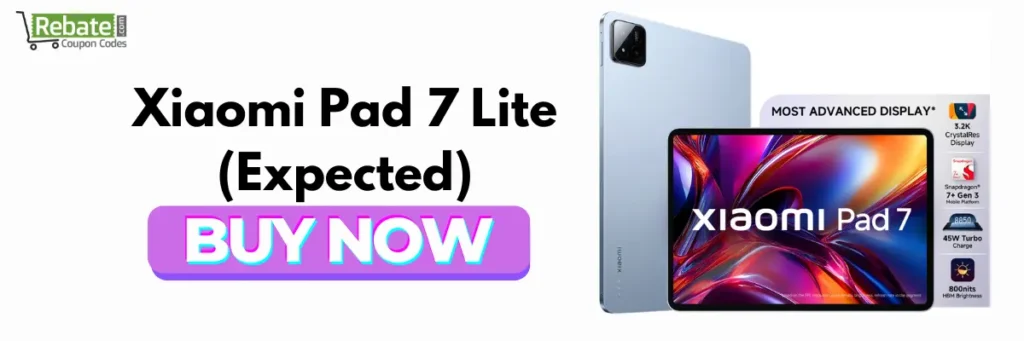
6. Xiaomi Pad 7 Lite (Expected) – A New Budget Contender
Key Specifications (Expected)
| Feature | Details |
|---|---|
| Display | Around 11-inch 2K Display |
| Processor | Mid-range Snapdragon/MediaTek Chipset |
| RAM | 6GB |
| Storage | 128GB |
| Battery | 🔋 8000mAh+ |
| Charging | ⚡ Fast Charging Support |
Note: Specifications and pricing may vary if Xiaomi launches this model in India. Always verify the latest details before purchasing.
Why It Could Be Worth Waiting For
Xiaomi has consistently offered value-for-money tablets, and if the Pad 7 Lite launches under ₹20,000, it could become one of the Best Tablets for Study in the budget segment.
Based on Xiaomi’s previous launches, students can expect:
- Large high-resolution display
- Smooth software experience
- Decent multitasking
- Long battery life
- Good value for money
If your purchase isn’t urgent, it may be worth keeping an eye on upcoming launches and sale events.
Expected Pros
- Modern design
- Better software optimization
- Large battery
- Excellent display
- Competitive pricing
Possible Cons
- Availability may be limited initially
- Final price may vary
Best For
- Students planning to buy later in the year
- Buyers looking for the latest technology
Expected Rating: ⭐⭐⭐⭐☆
7. Lenovo Tab K11 – Best Productivity Tablet for Students

Key Specifications
| Feature | Details |
|---|---|
| Display | 11-inch Full HD |
| Processor | MediaTek Helio G88 |
| RAM | 8GB |
| Storage | 128GB |
| Battery | 7040mAh |
| Stylus Support | ✏️ Yes |
Why It Stands Out
The Lenovo Tab K11 is an excellent choice for students who need a balance between studying, note-taking, and productivity.
The Full HD display offers crisp text and comfortable viewing, while the Helio G88 processor ensures smooth performance across educational apps. Students can easily use Microsoft Office, Google Docs, Canva, Zoom, and browser tabs simultaneously.
Stylus support makes it suitable for handwritten notes, highlighting PDFs, and creating diagrams during classes.
With 8GB RAM and 128GB storage, the tablet offers enough room for assignments, recorded lectures, PDFs, and apps without frequent storage issues.
Pros
- Stylus support
- 8GB RAM
- Clean software experience
- Good battery life
- Excellent productivity features
- Reliable performance
Cons
- Not designed for heavy gaming
- Charging could be faster
Best For
- College students
- Online classes
- Office work
- Digital note-taking
- Competitive exam preparation
Rating: ⭐⭐⭐⭐☆ (4.7/5)
Feature Comparison Table
| Tablet | Display | Performance | Battery | Best For | Rating |
| Redmi Pad SE | ⭐⭐⭐⭐☆ | ⭐⭐⭐⭐☆ | ⭐⭐⭐⭐⭐ | Overall | 4.8/5 |
| Lenovo Tab M11 | ⭐⭐⭐⭐☆ | ⭐⭐⭐⭐☆ | ⭐⭐⭐⭐☆ | Note Taking | 4.7/5 |
| Samsung Galaxy Tab A9+ | ⭐⭐⭐⭐⭐ | ⭐⭐⭐⭐⭐ | ⭐⭐⭐⭐☆ | Multitasking | 4.8/5 |
| Realme Pad 2 | ⭐⭐⭐⭐⭐ | ⭐⭐⭐⭐⭐ | ⭐⭐⭐⭐⭐ | Entertainment + Study | 4.8/5 |
| Honor Pad X9 | ⭐⭐⭐⭐⭐ | ⭐⭐⭐⭐☆ | ⭐⭐⭐⭐☆ | Reading | 4.6/5 |
| Xiaomi Pad 7 Lite* | ⭐⭐⭐⭐☆ | ⭐⭐⭐⭐☆ | ⭐⭐⭐⭐⭐ | Upcoming Option | Expected |
| Lenovo Tab K11 | ⭐⭐⭐⭐☆ | ⭐⭐⭐⭐☆ | ⭐⭐⭐⭐☆ | Productivity | 4.7/5 |
Our Top Recommendations
🏆 Best Overall Tablet for Study
Redmi Pad SE
A balanced choice with a large display, dependable Snapdragon processor, long battery life, and excellent value for money.
📝 Best Tablet for Note-Taking
Lenovo Tab M11
Stylus support and ample RAM make it ideal for handwritten notes, PDF annotations, and classroom productivity.
⚡ Best Performance Under ₹20,000
Samsung Galaxy Tab A9+
The Snapdragon 695 chipset and One UI software deliver a smooth multitasking experience for students.
🎬 Best Display for Online Learning
Realme Pad 2
Its 11.5-inch 2K, 120Hz display and Dolby Atmos speakers create an immersive experience for video lectures and eBooks.
📚 Best Budget Tablet for Reading
Honor Pad X9
The spacious 2K screen and six-speaker setup make long reading sessions and educational videos more enjoyable.
- Complete Buying Guide
- How to Choose the Best Tablet for Study
- Features You Should Never Ignore
- 5 SEO & AEO-Optimized FAQs
- Final Verdict
- Meta Title
- Meta Description
- URL Slug
- Internal Linking Suggestions
- FAQ Schema Markup
Buying Guide: How to Choose the Best Tablets for Study
Buying a tablet isn’t just about choosing the one with the highest specifications. The Best Tablets for Study should match your learning needs, budget, and daily usage. Whether you’re a school student, college student, or preparing for competitive exams, here are the most important factors to consider before making a purchase.
Before purchasing, don’t forget to check the latest Flipkart Coupon Codes & Deals to save more during sale events.
1. Display Size & Quality
Since you’ll spend hours reading PDFs, attending online classes, and watching educational videos, the display is one of the most important features.
Choose:
- 10.5 to 11.5-inch display for comfortable reading
- Full HD (1920×1200) or 2K resolution
- 90Hz or 120Hz refresh rate for smoother scrolling
- Eye-comfort or Reading Mode to reduce eye strain
A larger and sharper display makes studying much more comfortable than a smaller screen.
2. Processor Performance
A good processor ensures that your tablet runs smoothly without lag while using multiple educational apps.
Recommended processors include:
- Qualcomm Snapdragon 680
- Qualcomm Snapdragon 695
- MediaTek Helio G99
- MediaTek Helio G88
These chipsets can easily handle:
- Google Classroom
- Zoom
- Google Meet
- Microsoft Office
- Chrome
- YouTube
- Canva
- Note-taking apps
3. RAM & Storage
For long-term usability, don’t compromise on RAM or storage.
Recommended configuration:
- Minimum RAM: 6GB
- Ideal RAM: 8GB
- Storage: 128GB
- Expandable storage support is a bonus.
Having enough RAM allows you to switch between apps smoothly, while 128GB storage gives you plenty of room for PDFs, notes, assignments, videos, and apps.
4. Battery Life
Students often attend multiple classes in a day, so battery backup is essential.
Look for:
- 7000mAh–8500mAh battery
- Fast charging support (18W or higher)
A good battery means fewer charging interruptions during study sessions.
5. Stylus Support
If you enjoy handwriting notes, solving numerical problems, or annotating PDFs, choose a tablet with stylus support.
It’s particularly useful for:
- Engineering students
- Medical students
- Architecture students
- UPSC aspirants
- Digital note-taking
6. Software Experience
Clean software improves productivity.
Look for tablets that receive:
- Regular security updates
- Stable Android versions
- Productivity features such as split-screen mode
- Floating windows
- Multi-window support
7. Audio Quality
Online classes require clear sound.
Quad speakers with Dolby Atmos provide:
- Better lecture clarity
- Improved video learning experience
- Enhanced entertainment during breaks
Who Should Buy a Tablet?
A study tablet is a smart investment if you:
- Attend online classes regularly
- Read eBooks and PDF notes
- Prepare for UPSC, NEET, JEE, SSC, Banking, CAT, or GATE
- Take digital notes
- Use Google Workspace or Microsoft Office
- Watch recorded lectures on YouTube or educational platforms
If you’re preparing for NEET or JEE, you can also save on premium courses using our Physics Wallah Coupon Code.

Who Should Avoid Buying a Tablet?
You may want to consider a laptop instead if you:
- Need professional video editing
- Write code for long hours
- Run heavy software like AutoCAD or Adobe Premiere Pro
- Require desktop-level multitasking
- Prefer a full-size keyboard for extensive typing
Quick Buying Recommendations
Best Overall
Redmi Pad SE
Ideal for most students looking for excellent value under ₹20,000.
Best Performance
Samsung Galaxy Tab A9+
Great for multitasking, productivity, and long-term software reliability.
Best Display
Realme Pad 2
Perfect for students who spend long hours watching lectures or reading study material.
Best for Note-Taking
Lenovo Tab M11
Excellent choice if handwritten notes and PDF annotations are part of your workflow.
Best Value
Honor Pad X9
A large display and immersive speakers make it a solid option for reading and online learning.
Medical aspirants can also explore our latest PW MedEd Coupon Code to reduce the cost of online coaching.
Frequently Asked Questions (FAQs)
The Redmi Pad SE is one of the Best Tablets for Study under ₹20,000 because it offers a large 11-inch display, dependable performance, long battery life, and excellent value for students.
It depends on your needs. Tablets are ideal for reading, note-taking, attending online classes, and watching lectures, while laptops are better suited for programming, advanced multitasking, and professional software.
For a smooth experience, choose at least 6GB RAM. If your budget allows, 8GB RAM provides better multitasking and longer usability.
The Lenovo Tab M11 is an excellent option because it supports stylus input, offers good performance, and is well-suited for digital note-taking and online learning.
Yes. Tablets are great for preparing for exams like UPSC, NEET, JEE, SSC, Banking, CAT, and GATE. They allow you to access online courses, solve mock tests, read PDFs, and organize notes efficiently.
Final Verdict
Finding the Best Tablets for Study doesn’t have to be complicated. The right choice depends on your budget and how you plan to use the device.
If you’re looking for the best all-round performer, the Redmi Pad SE is an excellent pick. Students who prioritize multitasking and software experience should consider the Samsung Galaxy Tab A9+, while those who prefer digital note-taking will appreciate the Lenovo Tab M11. If display quality and entertainment matter most, the Realme Pad 2 stands out with its 2K 120Hz screen.
Before purchasing, compare the latest prices on Amazon and Flipkart, especially during sale events, as tablets under ₹20,000 often receive attractive discounts.
No matter which option you choose, investing in a reliable study tablet can make learning more organized, productive, and enjoyable.